Learn your first Python program explained line by line with this beginner-friendly tutorial. Understand the Python Hello World program, syntax, print function, and basic coding concepts.
Table of Contents
Introduction: Your First Python Program
Congratulations:
If you have already installed Python on your computer, then you are now ready to write your first Python program.
This is one of the most exciting moments for every beginner.
Why?
Because this is the moment when you stop being just a learner and become a real programmer.
Almost every programmer in the world starts with the same simple code:
print("Hello, World!")It may look small, but this simple line introduces some of the most important concepts of Python programming for beginners.
In this lesson, we will break everything down line by line so even absolute beginners can understand.
What Is a Python Program?
Before writing code, let’s understand something important.
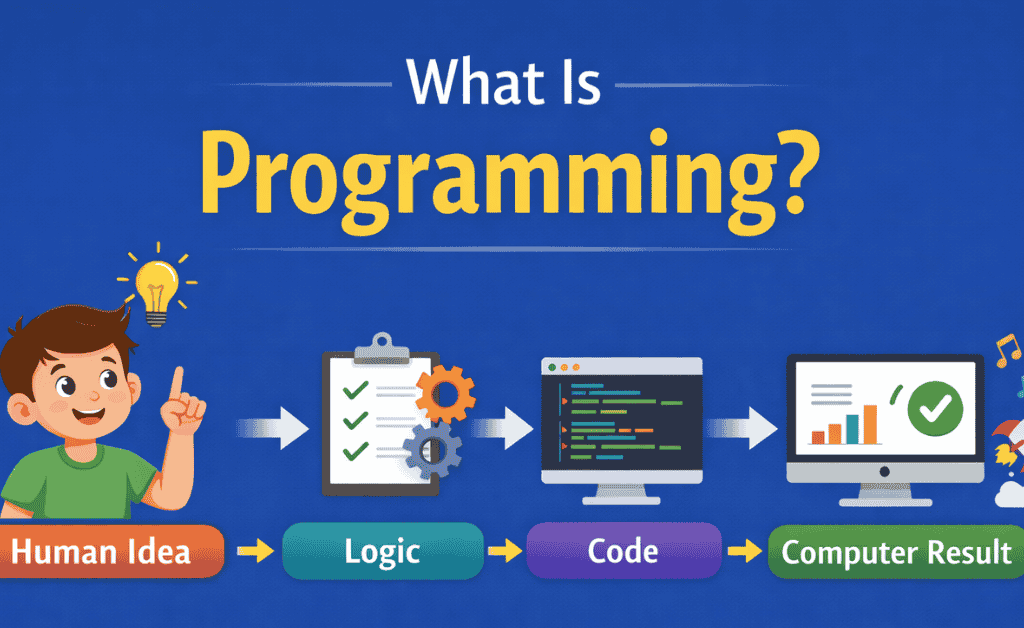
A Python program is simply a set of instructions written for the computer.
These instructions tell the computer what to do.
For example:
- Show text
- Solve calculations
- Store information
- Make decisions
- Create applications
Think of a Python program like a recipe.
A recipe tells a chef what steps to follow.
A Python program tells a computer what steps to follow.
That is why understanding your first Python program is essential.
Writing Your First Python Program
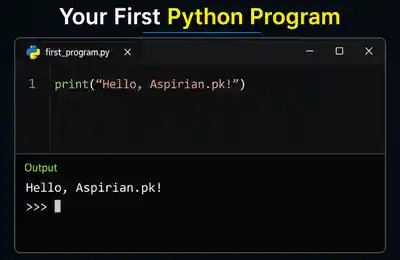
Open Python and type:
print("Hello, Aspirian.pk!")Then press Enter.
You should see:
Hello, Aspirian.pk!
Congratulations.
You have officially written your first Python code.
Line-by-Line Explanation
Now let’s deeply understand this program.
Part 1: The print() Function
The word:
print()
is called a function in Python.
A function is a command that performs an action.
The print() function tells Python:
👉 Display something on the screen
For example:
print("Welcome")Output:
Welcome
This is one of the most used commands in Python.
It is the foundation of every Python basics tutorial.
Tags / Keywords:python print function, python functions for beginners
Part 2: The Parentheses ()
The brackets:
()
are called parentheses.
They are used to pass information to the function.
Without them, Python would not understand your instruction.
Correct:
print("Hello")Wrong:
print "Hello"
Python requires correct syntax.
Tags / Keywords:python syntax, python brackets
Part 3: The Quotation Marks ""
These:
" "
are quotation marks.
Anything inside quotation marks is treated as text (string).
Example:
print("Python is awesome")Output:
Python is awesome
Without quotation marks, Python assumes the word is a variable.
Tags / Keywords:python strings, quotation marks in python
Part 4: The Message Inside
This part:
Hello, Aspirian.pk!
is the actual text being displayed.
You can replace it with anything.
Example:
print("I am learning Python")Output:
I am learning Python
This flexibility is what makes Python programming for beginners so easy.
Why Every Programmer Starts Here
You might wonder:
Why does everyone start with this?
Because this simple program teaches:
✅ Syntax
✅ Functions
✅ Output
✅ Confidence
It proves your Python installation works.
It introduces you to writing code.
It gives your first success.
That’s huge for beginners.
Real-Life Example: Talking to a Robot
Imagine you have a robot assistant.
You tell it:
“Say Hello”
The robot responds:
Hello
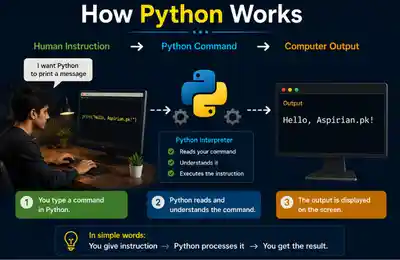
Python works the same way.
You write:
print("Hello")Python responds by showing:
Hello
This is how computers follow instructions.
This is the core of learn Python step by step.
Common Mistakes Beginners Make
Learning your first Python program is easy, but beginners often make small mistakes.
Mistake 1: Missing Quotes
Wrong:
print(Hello)
Correct:
print("Hello")Mistake 2: Missing Parentheses
Wrong:
print "Hello"
Correct:
print("Hello")Mistake 3: Wrong Spelling
Wrong:
prit("Hello")Correct:
print("Hello")Python is case-sensitive and spelling-sensitive.
Experiment With Your Program
Try changing the message.
Example 1:
print("Welcome to Aspirian.pk")Example 2:
print("Python is my future skill")Example 3:
print("I will become a programmer")This helps you build confidence.
What This Program Teaches You
Your first Python program introduces:
1. Output
Showing information
2. Syntax
Correct writing rules
3. Functions
Built-in Python commands
4. Debugging
Fixing mistakes
These are the building blocks of Python basics tutorial.
Aspirian.pk Practical Connection
On Aspirian.pk, every tool begins with output logic.
For example, the GPA calculator:
Input → Calculation → Output
Your first Python program follows the same principle.
print("Output")This is why even simple code matters.
Why This Matters Globally in 2026
Students across:
- Pakistan
- India
- USA
- Australia
- Canada
All begin their coding journey with the same first program.
This tiny line connects you to millions of learners worldwide.
That’s why platforms like Techfresh Guru include this lesson as the foundation of Python mastery.
Practice Exercises
Try these:
Exercise 1
print("My name is Ali")Exercise 2
print("I am learning Python")Exercise 3
print("Aspirian.pk is helping me learn coding")Challenge Task
Create a Python program that prints:
- Your name
- Your class
- Your goal
Example:
print("Name: Ahmed")
print("Class: 10th")
print("Goal: Become a Python Developer")
This is your first mini project.
Internal Linking (Aspirian.pk Strategy)
👉 Previous Lesson:
How to Install Python on Windows (Step-by-Step for Beginners)
👉 Next Lesson:
Variables in Python – Easy Explanation with Daily Life Examples
External Linking (Authority Signal)
For official reference and future learning:
Python Official Documentation (for reference & learning)
Final Thoughts
Today you wrote your first Python program.
That may seem small, but it’s a massive milestone.
You learned:
✅ What Python code is
✅ How print() works
✅ Syntax basics
✅ Common mistakes
✅ Practical exercises
This is your real beginning.
Every expert programmer once typed their first:
print("Hello, World!")Today, you joined that journey 🚀
Boost Your Tech Career with TechFreshGuru
While our Free Online Tools help you with daily translation needs, the future belongs to those who build the technology behind these tools. If you are inspired by the power of Free Online Tools like our Roman Urdu to English translator, it’s time to learn how to create them yourself.
Visit TechFreshGuru: Trending Courses 2026 to enroll in professional training:
- AI Fundamentals
- Python Programming
- Web Development
- Digital Marketing & SEO
- WordPress Mastery Course
Take the first step toward a successful tech career today at TechFreshGuru!
Aspirian.pk Free Online Tools
🔹 Free Online Tools on Aspirian.pk
- Percentage Calculator: Calculate your exam percentages instantly.
- CGPA Converter: Convert percentages to CGPA automatically.
- Roman Urdu to Englsih Converter: A simple translator for basic sentences.
All these tools are built using programming logic, making them perfect real-world examples for beginners.