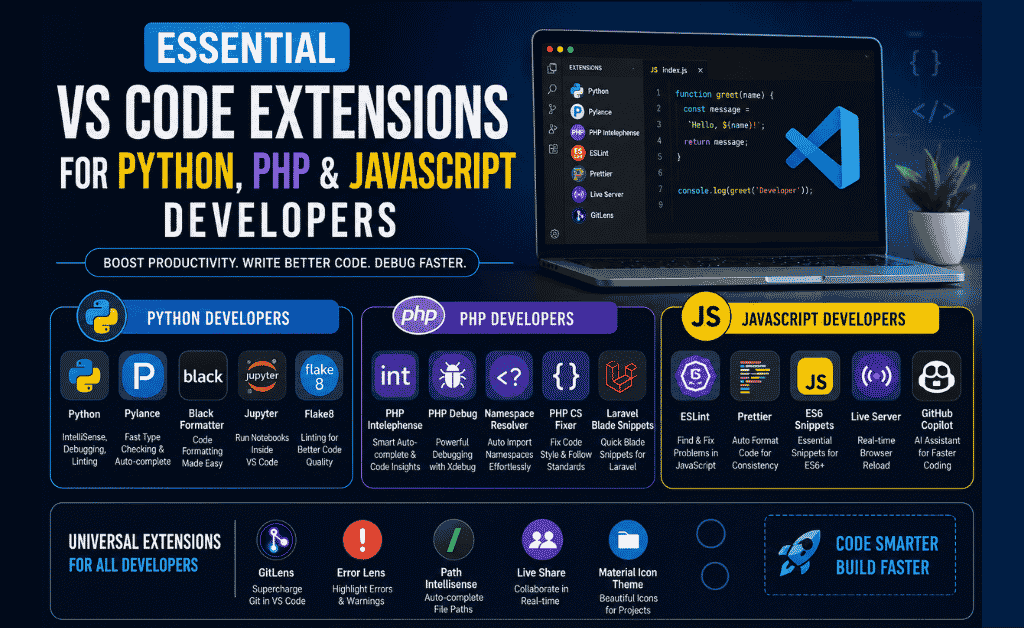
Essential VS Code Extensions for Python, PHP, and JavaScript Developers play a crucial role in improving coding speed, code quality, and overall workflow. Whether you’re building web applications, APIs, or automation scripts, the right extensions in Visual Studio Code can significantly enhance your development experience.
In this guide, we’ll explore the most useful VS Code extensions for Python, PHP, and JavaScript developers to help you work faster, smarter, and more efficiently.
Why You Need These Extensions
Using the right extensions can transform your coding workflow by offering:
Smart auto-completion (IntelliSense)
Real-time error detection
Automatic code formatting
Faster debugging
Code snippets and shortcuts
Live preview for web projects
Improved project organization
These tools save time and help developers focus more on logic instead of repetitive tasks.
Table of Contents
Essential VS Code Extensions for Python Developers
1. Python (by Microsoft) Essential VS Code Extensions for Python
The official Python extension is essential for any Python developer. It provides IntelliSense, debugging, linting, and seamless code navigation. It also supports virtual environments and testing tools.
Key Features:
- IntelliSense for smart code completion
- Built-in debugging support
- Linting and error detection
- Virtual environment integration
2. Pylance
Pylance offers fast and accurate type checking with enhanced IntelliSense. It improves code suggestions and helps detect errors early, making your Python development smoother and more efficient.
Key Features:
- Advanced IntelliSense
- Fast type checking
- Auto-import suggestions
- Improved code navigation
3. Black Formatter
Black automatically formats your Python code according to standard style guidelines. It ensures consistency across projects and reduces time spent on manual formatting.
Key Features:
- Integration with VS Code
- Automatic code formatting
- Consistent style enforcement
- One-click formatting
4. Jupyter
Jupyter allows you to run notebooks directly inside VS Code, making it perfect for data science and machine learning projects.
Key Features:
- Run Jupyter notebooks
- Interactive data visualization
- Cell-based execution
- Integrated Python support
5. Flake8
Flake8 is a powerful linting tool that helps maintain high-quality Python code by detecting errors and bad practices.
Key Features:
- Syntax error detection
- Code style enforcement
- Unused variable detection
- Lightweight and fast
Best VS Code Extensions for PHP Developers
1. PHP Intelephense
PHP Intelephense is one of the most powerful extensions for PHP development. It offers advanced code intelligence and improves overall productivity.
Key Features:
- PHP symbol searchstant Local Preview
- Smart auto-completion
- Fast code navigation
- Error detection
2. PHP Debug
PHP Debug integrates with Xdebug to provide professional debugging tools directly inside VS Code.
Key Features:
- Breakpoints support
- Step-by-step debugging
- Variable inspection
- Stack trace analysis
3. PHP Namespace Resolver
This extension automatically manages namespaces and imports, reducing manual effort in large PHP projects.
Key Features:
- Auto-import classes
- Namespace organization
- Cleaner code structure
- Time-saving automation
4. PHP CS Fixer
PHP CS Fixer ensures your code follows proper coding standards and formatting rules.
Key Features:
- Automatic code formatting
- PSR standards support
- Cleaner and readable code
- Easy integration
5. Laravel Blade Snippets
This extension is ideal for Laravel developers working with Blade templates.
Key Features:
- Pre-built Blade snippets
- Faster template writing
- Improved productivity
- Easy syntax shortcuts
Best VS Code Extensions for JavaScript Developer
1. ESLint
ESLint is essential for maintaining high-quality JavaScript code by detecting errors and enforcing coding standards.
Key Features:
- Real-time error detection
- Auto-fix common issues
- Custom rule configuration
- Framework support (React, Vue, Node.js)
2. Prettier
Prettier automatically formats your code to ensure consistency across your project.
Key Features:
- Auto formatting on save
- Multi-language support
- Clean and readable code
- Integration with ESLint
3. JavaScript (ES6) Code Snippets
This extension provides ready-to-use code snippets that speed up development.
Key Features:
- Predefined JS snippets
- Faster coding
- Reduced repetition
- Modern ES6 support
4. Live Server
Live Server helps frontend developers by providing real-time preview of web projects.
Key Features:
- Auto browser refresh
- Local development server
- Fast testing
- Simple setup
5. GitHub Copilot (Optional)
GitHub Copilot is an AI-powered coding assistant that helps generate code quickly.
Key Features:
- AI code suggestions
- Full line & function generation
- Multi-language support
- Productivity boost
Universal VS Code Extensions (For All Developers)
1. GitLens
GitLens enhances Git capabilities and provides deep insights into your codebase.
Key Features:
- Commit history tracking
- File authorship
- Visual Git graph
- Code comparison tools
2. Error Lens
Error Lens highlights issues directly in your code, making debugging easier.
Key Features:
- Inline error display
- Faster debugging
- Visual warnings
- Improved readability
3. Path Intellisense
Path Intellisense automatically suggests file paths while coding.
Key Features:
- Auto path completion
- Reduced typing errors
- Faster navigation
- Improved efficiency
4. Live Share
Live Share allows real-time collaboration between developers.
Key Features:
- Real-time code sharing
- Collaborative debugging
- Remote team support
- Secure sessions
5. Material Icon Theme
This extension enhances the visual appearance of VS Code.
Key Features:
- Modern file icons
- Better file recognition
- Clean UI design
- Dark/light theme support
Bonus Extensions for 2026
✔ Code Runner Ultra – Run code instantly
✔ Error Lens Pro – Highlight errors directly in the editor
✔ Thunder Client Next – API testing alternative to Postman
✔ Bracket Pair Colorizer 3 – Clear bracket matching
✔ Markdown All-in-One – Perfect for documentation writin
Final Thoughts
Using the right VS Code extensions can completely transform your development workflow. Whether you are a Python, PHP, or JavaScript developer, these tools help you write cleaner code, debug faster, and improve productivity.
Start with the essential extensions listed above and gradually customize your VS Code setup based on your needs.
Job Portal for Students & Freelancers
Looking for jobs or internships?
✔ Latest Jobs in Pakistan
✔ Freelancing Opportunities
✔ Remote Jobs
✔ Student Internships
📌 Aspirian.pk job portal helps you find online earning opportunities, career growth, and latest job updates.
Looking for a Better Job? Start Your Career Journey Today!
Find the latest fresh jobs, internships, online earning opportunities, and skill-based career options — all in one place.
Explore Free Online Tools on Aspirian.pk
Popular Free Online AI Tools You May Like
- Roman Urdu to English – A simple translator for basic sentences.
- Number to Words – Convert figures into words
- GPA & Grade Calculator – Calculate board percentages and grades.
- Age Calculator – Find your exact age
- MS Word to PDF – Word to PDF Converter
- Lorem Ipsum Generator – Professional dummy text tool.
Explore all tools here:
Free Online Tools for Students – Aspirian.pk

Boost Your Tech Career
Want to learn programming and freelancing skills?
✔ Python Programming
✔ Web Development
✔ Digital Markting
✔ WordPress Mastery
✔ AI Automation
✔ Freelancing Skills
✔ AI Tools Training
Start your journey towards a successful tech career today.

Frequently Asked Questions (FAQs)
1. What are VS Code extensions used for?
VS Code extensions add extra features to Visual Studio Code such as debugging tools, code formatting, language support, themes, and productivity boosters. They enhance your coding experience and make development faster and more efficient.
2. Which VS Code extensions are essential for Python developers?
Python developers should use extensions like Python (Microsoft) for debugging and IntelliSense, Pylance for fast type checking, Black Formatter for clean formatting, and Jupyter for notebook support.
3. What is the best VS Code extension for PHP development?
The most popular and essential extension for PHP is PHP Intelephense because it offers smart auto-completion, error detection, and advanced code navigation. Developers also rely on PHP Debug and PHP CS Fixer.
4. Which VS Code extensions are recommended for JavaScript developers?
JavaScript developers commonly use ESLint, Prettier, JavaScript ES6 Snippets, and Live Server to improve coding accuracy, speed, and testing workflow.
5. Is GitHub Copilot worth using for beginners?
Yes, GitHub Copilot is helpful for beginners as it provides AI-powered code suggestions, completes functions, and generates snippets, helping new developers learn faster.