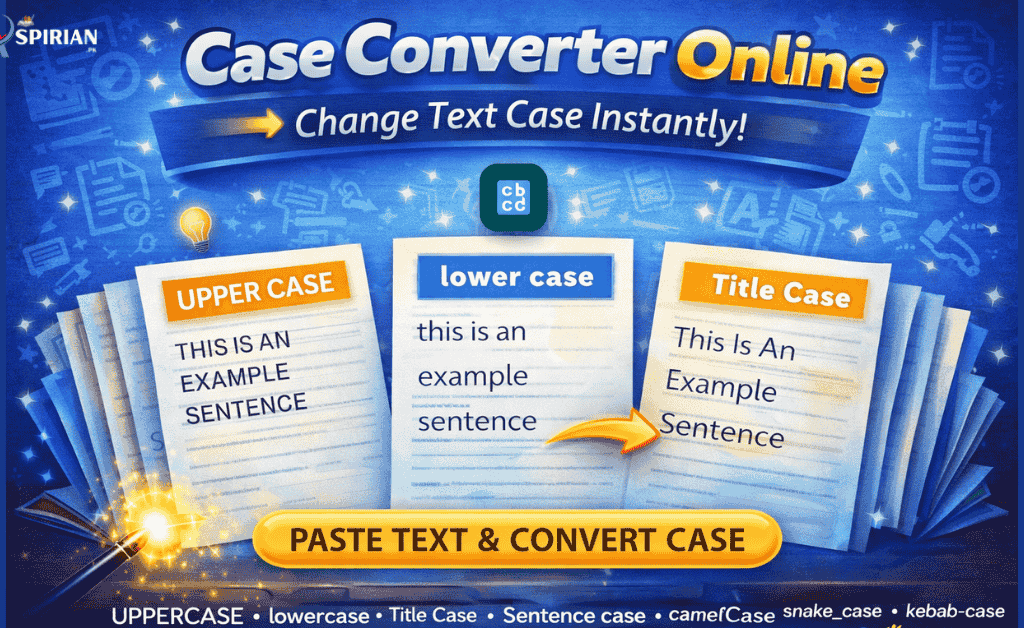
Use our free Case Converter Online Tool to instantly convert your text into UPPERCASE, lowercase, Title Case, Sentence case, and 14+ other formatting styles. Perfect for students fixing assignment headings, bloggers formatting titles, and writers ensuring clean document formatting instantly.
Table of Contents
What Is a Case Converter Online Tool and Why Students Need It?
A Case Converter is an online tool that helps you quickly change text into different letter-case formats such as UPPERCASE, lowercase, Title Case, and Sentence Case. Students often need proper capitalization for:
- Assignments
- Essay headings
- Notes
- Research reports
- CVs and resumes
- Web content
- Social media posts
Instead of formatting text manually, a case converter provides instant, error-free text capitalization.
In 2026, where everything is digital and fast-paced, students expect tools that save time and improve document quality—this is exactly where the Case Converter becomes essential.
How Case Converter Online Tool Helps in Writing & Formatting
This tool helps students and writers:
- Fix headings that look messy
- Convert long texts into readable formats
- Improve presentation quality
- Avoid capitalization mistakes
- Prepare assignment titles professionally
- Format blogs, reports, and project files faster
It is extremely useful for reducing manual editing time and improving writing clarity.
Supported Text Case Formats
Aspirian.pk Case Converter includes 14+ case styles, including:
- UPPERCASE
- lowercase
- Title Case
- Sentence case
- PascalCase
- camelCase
- snake_case
- kebab-case
- aLtErNaTe Case
- CONSTANT_CASE
- Reversed Case
- dot.case
- Remove Spaces
- Clear All
These formats cover academic, technical, coding, and content writing needs.
Features of a Professional Case Converter Online Tool
🔹 Instant Text Conversion
Convert text into any case format within seconds.
🔹 100% Free & No Sign-up
No login required, no limitations.
🔹 Supports 14+ Case Styles
More variety than most online case converters.
🔹 Perfect for Students & Writers
Designed for assignment formatting, blogging, and coding.
🔹 Clean & Beginner-Friendly Interface
Simple to use on mobile and desktop.
🔹 One-Click Copy
Copy the formatted text instantly.
Step-by-Step: How to Use Case Converter Online Tool
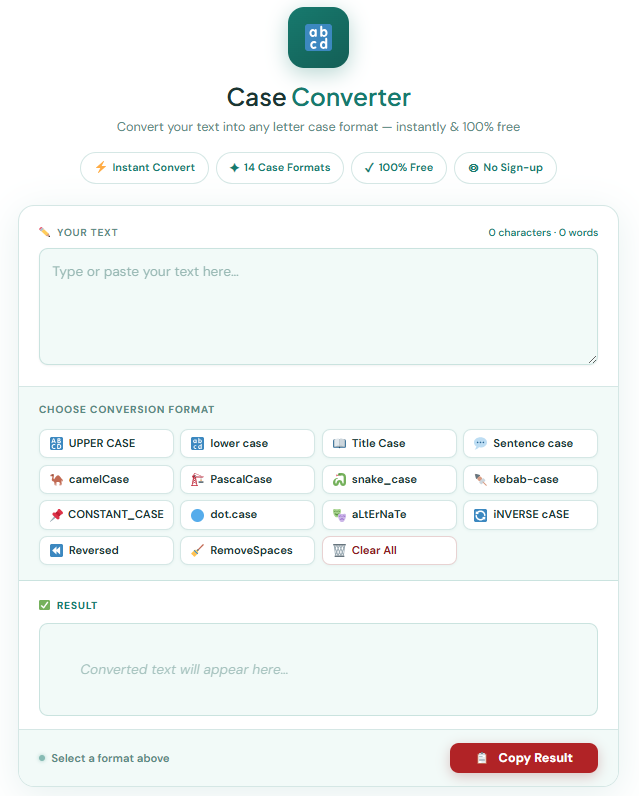
Step 1: Open the Case Converter Online Tool
Visit the Case Converter page on Aspirian.pk.
Use the Case Converter Online Tool
Quickly convert your text into Uppercase, Lowercase, Title Case, or Sentence Case in one click.
Step 2: Paste Your Text
Example:
“this is my assignment heading”
Step 3: Choose a Case Format
For example:
➡ Title Case
Converted Output:
“This Is My Assignment Heading”
Step 4: Copy & Use Anywhere
Use it for:
- Assignments
- Reports
- Emails
- Blog writing
- CV formatting
Why Students Prefer Aspirian.pk Case Converter Online Tool
Students love this tool because it:
- Saves time
- Avoids manual capitalization errors
- Improves assignment readability
- Provides 14+ case options
- Works on any device
- Requires no registration
It is built specially for students and online writers.
Case Converter for Assignments, Reports & Online Writing
This tool is ideal for:
- English assignments
- University reports
- Paragraph formatting
- Proper headings
- Notes preparation
- Blog titles & SEO formatting
- Coding-related case formatting
You can copy the formatted text directly into:
- MS Word
- Google Docs
- PowerPoint
- PDF files
- Websites
- Social posts

SEO & Academic Benefits of Using Case Converter Online Tool
Using the Case Converter improves:
- Document presentation
- Heading readability
- Proper capitalization habits
- Faster writing workflow
- Formatting consistency
Writers and students both get cleaner, more professional results.
Final Thoughts: Write Better with Aspirian.pk Tools
At Aspirian.pk, we help students write smarter using AI-powered educational tools. The AI Content Humanizer is designed to make your writing natural, readable, and assignment-ready—without losing the original meaning.
Stay connected with Aspirian.pk for more free tools, notes, study resources, and smart AI writing support.
Frequently Asked Questions (FAQs)
What does a Case Converter Online Tool do?
It changes your text into different letter-case formats instantly.
Is this Case Converter free?
Yes, completely free.
Does it support multiple case styles?
Yes, more than 14 styles.
Can it be used for academic writing?
Absolutely — especially for headings and formatting.
Does it work on mobile?
Yes, works perfectly on all devices.
External Authority References (Trusted Writing & Learning Sources)
To ensure natural writing quality and proper English usage, our humanizer aligns with trusted global learning platforms:
- Wikipedia – Learn about natural language, writing styles, and AI-generated content.
- Cambridge Dictionary – Trusted source for correct word meanings and usage.
- Oxford Learner’s Dictionaries – Grammar, vocabulary, and academic writing support.
- British Council – Official English learning and writing improvement content.
- Grammarly Blog – Professional writing advice and style improvement tips.
- Explore More Free Online Tools for Students on Aspirian.pk
Aspirian.pk provides a growing collection of student-focused tools for writing, studying, and productivity.
Explore More Free Online Tools for Students on Aspirian.pk
Aspirian.pk offers many free AI tools to support learning:
Aspirian.pk provides:
- AI Essay Outline Generator
- AI Content Humanizer & Rewriter
- Roman Urdu to English Translator
- Image to Text Converter
- Numbers to Words Converter
- Word to PDF Converter
Perfect for school, college, and university students.

Popular Free Online AI Tools You May Like
- Roman Urdu to English – A simple translator for basic sentences.
- Number to Words – Convert figures into words
- GPA & Grade Calculator – Calculate board percentages and grades.
- Age Calculator – Find your exact age
- MS Word to PDF – Word to PDF Converter
- Lorem Ipsum Generator – Professional dummy text tool.
Explore all tools here:
Free Online Tools for Students – Aspirian.pk
Boost Your Tech Career with TechFreshGuru
While our Free Online Tools help you with daily translation needs, the future belongs to those who build the technology behind these tools. If you are inspired by the power of Free Online Tools like our Roman Urdu to English translator, it’s time to learn how to create them yourself.
Visit TechFreshGuru: Trending Courses 2026 to enroll in professional training:
- Full Stack Web Development: Learn to build your own suite of Free Online Tools.
- AI & Machine Learning: Master the technology that powers modern translators.
- Digital Marketing: Learn how to rank your own tools on Google’s first page.
- WordPress Mastery Course: Build professional websites and powerful tool dashboards without writing a single line of code.
Take the first step toward a successful tech career today at TechFreshGuru!